Welcome to CrisisDeck
A multiplayer OT/ICS cybersecurity tabletop exercise where your team practices incident response to industrial cyber threats using realistic attack scenarios.
What is CrisisDeck?
CrisisDeck is a tabletop exercise (TTX) platform for OT/ICS cybersecurity training. Unlike live-fire penetration testing or technical simulations, this is a discussion-based exercise where teams walk through realistic attack scenarios, practice decision-making, and learn incident response protocols.
One person acts as the Exercise Facilitator (Host), presenting realistic cyber threat scenarios affecting an industrial facility (water treatment, power grid, pipeline, etc.). Other participants assume ICS-202 compliant roles (Incident Commander, Operations Chief, Planning Chief, PIO) and must coordinate their response.
This is NOT a cyberattack simulation or hacking game. It's a professional training tool designed to improve team coordination, test incident response plans, and practice critical decision-making in a safe environment.
2-6 Players
Plus one Host
15-30 Minutes
Per scenario
Goal
Respond & mitigate
Two Ways to Play
The Host
Facilitator Mode
The Host facilitates the tabletop exercise. You don't play a role — instead, you:
- Create the session and share the room code
- Start the simulation when everyone's ready
- Trigger scenario events ("injects")
- Advance the story based on player decisions
- Observe all player screens in God Mode
The Player
Role-Based View
Players join with a room code and choose a role. Each role sees a different dashboard:
- View your role-specific dashboard
- Receive real-time alerts and emails
- Communicate with your team
- Vote on critical decisions
- Experience the consequences
Player Roles
Operations Section Chief (Ops Chief)
Oversees all tactical field operations including SCADA/HMI monitoring, process control, and physical safety. Manages the hands-on technical response to the incident.
Key Responsibilities:
- Monitor SCADA systems for process anomalies and unauthorized changes
- Coordinate manual control procedures when automation fails
- Maintain safe operations and prevent physical damage
- Report operational status to Incident Commander
How a Session Works
Exercise Flow: Who Steps In When
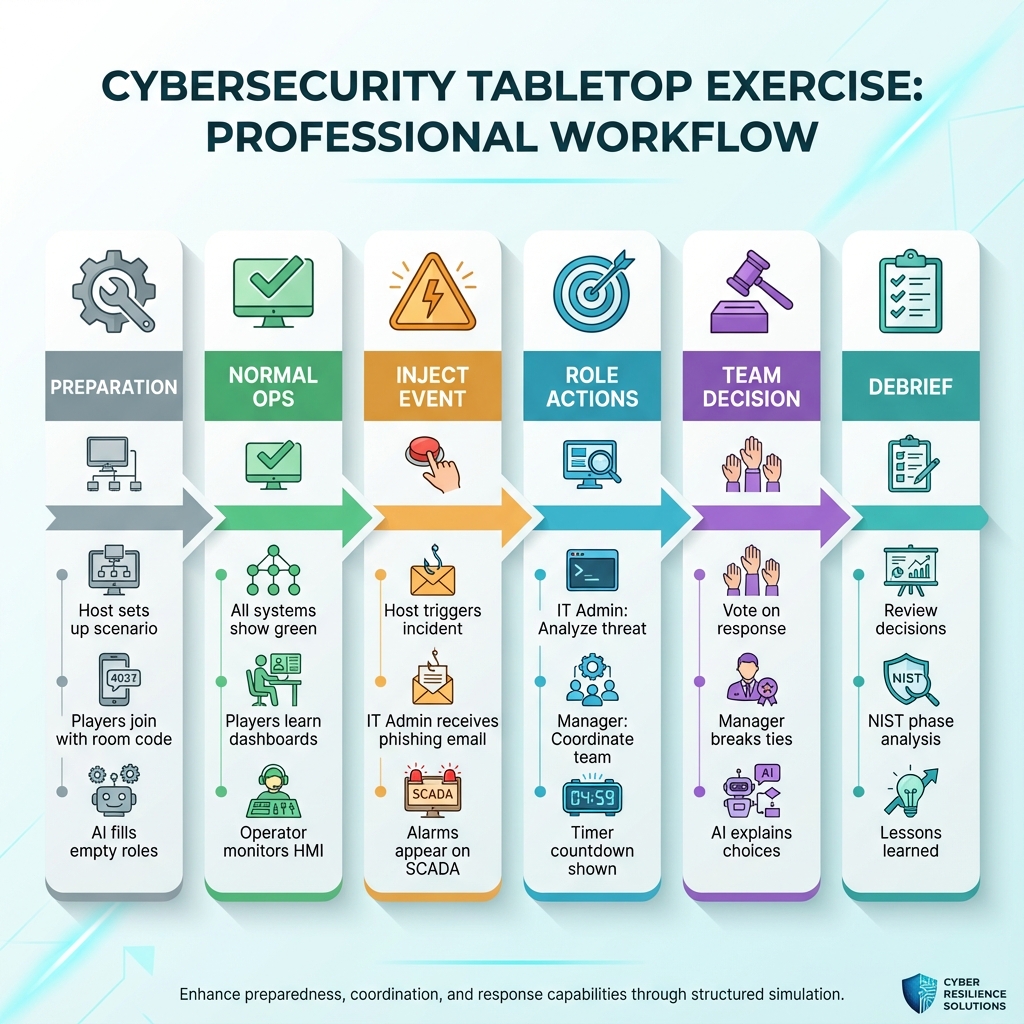
Each phase activates different team members. The Host controls the flow, while players respond to events based on their role.
Lobby Phase
Host creates a session and shares the room code. Players join and select their roles.
Normal Operations
All systems appear green. Players familiarize themselves with their dashboards.
The Inject
Host triggers an event. A phishing email arrives or an alarm goes off.
Team Response
Players discuss and vote on how to respond. Time is limited!
Consequences
AI generates realistic outcomes based on your decisions. The scenario escalates.
Debrief
Review your performance, learn from mistakes, and discuss improvements.
Tips for a Great Session
- Communicate! Talk to your team about what you're seeing on your screen.
- Stay in character — what would your role actually do?
- Time pressure is real. Don't overthink, make a decision!
- There's no perfect answer. Learn from whatever happens.
- Use a video call for remote teams so you can discuss in real-time.
Ready to Begin?
Choose your path and start your first tabletop exercise.